As a Software Developer for my day job, I am using a lot of AI tools paid for by the company I am working for.
But the issue is, it is only for the projects I am doing for them.
I really like the capabilities of AI tools nowadays, but I do not want to risk the huge bills for myself that cloud agents can consume.
That is why I decided I would try to set up on my desktop with an RTX 5090.
This video card has 32GB of available VRAM, and the PC has 128GB of normal RAM.
As I talked to Gemini in the Google browser, it tried to convince me that my PC is good enough and I should not think about buying those large RAM M4 Macs.
So I decided to give it a try on my local machine, and I wonder what I can make out of it.
First, I set up a dual-boot with Ubuntu alongside Windows.
Next, I installed the essentials:
- A browser
- The drivers for my card with:
- `sudo ubuntu-drivers install`
- Ollama with the instructions on its website: https://ollama.com/
- `curl -fsSL https://ollama.com/install.sh | sh`
- Here, I selected Claude Code (v2.1.197) as an option
- Then qwen3.6 as a model that uses 28GB of VRAM
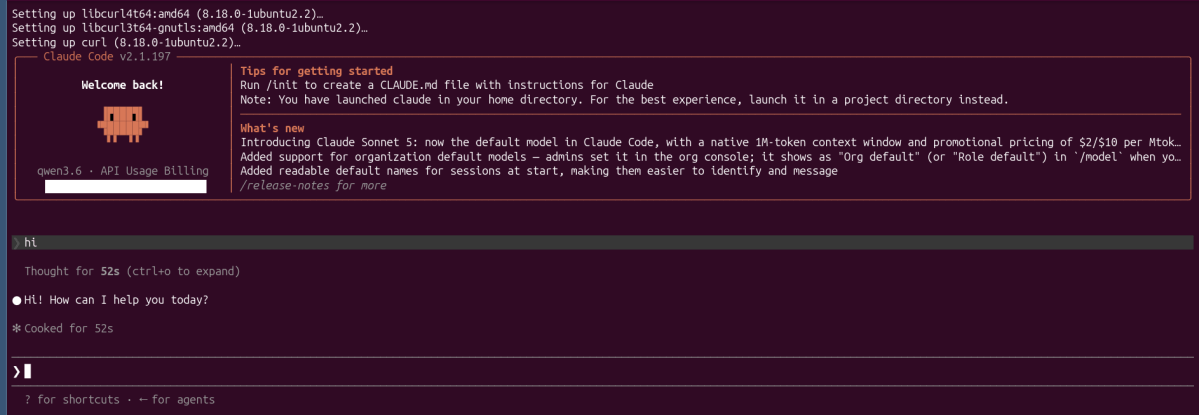
When it finished, it prompted some questions about terminal color preferences, then showed the screen below.

As I checked, the model was not loaded into VRAM yet, only after I triggered a simple “hi” prompt. It took 52 seconds to load the model and give me a response.
While I was having a discussion with the agent, I asked it to go out and make a search on the web, but it ran into issues because of the local setup. It could not make a web search through the Anthropic API; regarding Google, it ran into ‘bot’ checking issues, but it was able to use DuckDuckGo with curl.
It also had another issue with summarizing the answer because of low output token settings.
It recommended to update it like:
echo 'export CLAUDE_CODE_MAX_OUTPUT_TOKENS=1000000' >> ~/.bashrc
For now, I set it to 400000. I wonder how much it can do with it.
Side Note: I tried this same Claude setup with Ollama on Windows WSL, but it could not install Claude automatically. Instead, it only gave me a URL pointing to how to do it manually. I stopped there for now.
